
Categories
MIK Systems Explained: A Simple Guide to Profile, HD, Studs & Hooks

A Simple Guide To MIK
What Is MIK?
If you’ve been looking at new bike bags or baskets recently, you’ve probably come across something called MIK. It stands for Mounting Is Key. In simple terms, MIK is a click-on system that lets you attach and remove bike accessories in seconds. No bungee cords, no awkward straps, no fiddling around. Just click it on, ride off, and unclip it when you’re done.
It was developed by Dutch cycling brand Basil and has since been adopted by lots of other bike and accessory brands, which means it’s become a widely compatible system rather than something tied to just one manufacturer.
So, What Does MIK Do?
MIK is a universal mounting system designed for luggage racks. It allows you to securely attach things like pannier bags, baskets, crates, pet carriers and child seats (with the HD version).
The main benefit? You can swap accessories in seconds. Use a basket for a quick food shop, switch to a pannier for commuting, or remove everything entirely for a lighter weekend ride.
How MIK Works
The system is made up of two main parts:
This sits on the bottom of your bag, basket, or crate. Some accessories come with it already fitted. Others can be made compatible by adding one.
2. The MIK Rack or Carrier Plate
Your bike either:
- Has a luggage rack with integrated MIK profiles built in, or
- Can be fitted with a separate MIK carrier plate to make it compatible
Once both parts are in place, you simply place the accessory onto the rack and press down until you hear a click. That’s it - it’s locked in!
To remove it, you use the release mechanism (usually a key or lever depending on the version), and lift it off.
The Four MIK Systems Explained
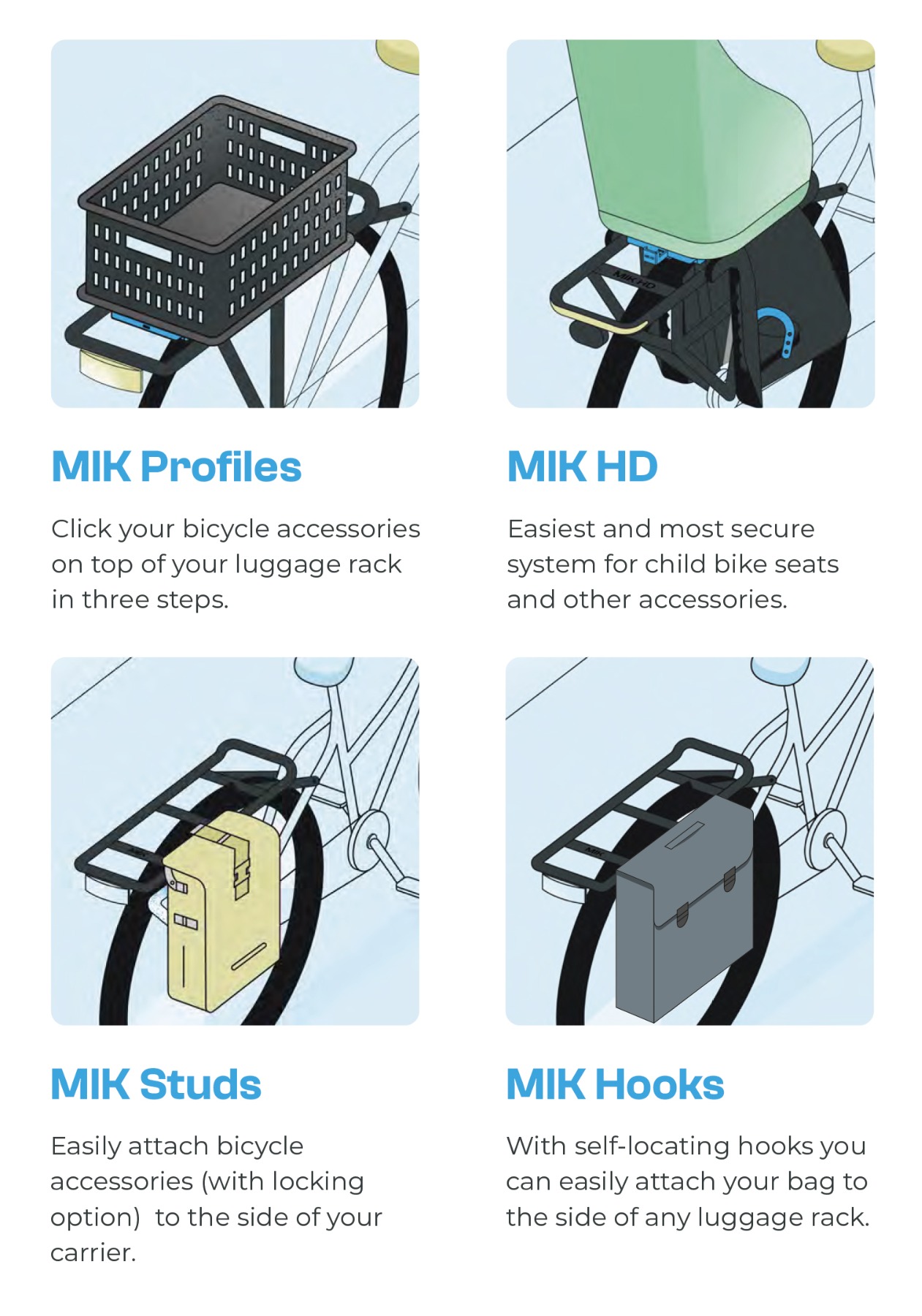
Although people often just say “MIK,” there are actually four variations within the system, each designed for slightly different uses.
The MIK system has four variations, each suited to different accessories or loads. Together, these four options make the system adaptable across different bikes, loads and riding styles.
1. MIK Profiles
This is the standard system built into many modern luggage racks. Accessories with a MIK adapter plate simply click on top. It’s perfect for everyday bags, baskets, and crates.
Designed for heavier loads like child seats or large cargo bags. HD racks are reinforced to safely carry extra weight and are clearly marked. You shouldn’t use a standard MIK profile rack for heavy accessories — that’s what HD is for.
3. MIK Studs
Studs allow accessories to attach to the sides of your luggage rack instead of on top. This is useful for extra bags, giving more flexibility for load distribution.
4. MIK Hooks
Hooks provide another side-mounting option, letting you hang bags securely from the side of your rack. Like studs, they help make full use of rack space while keeping everything stable.
What’s The Difference Between MIK And MIK HD?
You will see two versions of MIK:
Standard MIK
Perfect for everyday accessories like bags and baskets.
MIK HD (Heavy Duty)
Designed for heavier loads, including child seats. If you’re carrying extra weight, this is the one to look for. Racks that support it are clearly marked.
These only come pre-fitted to exclusive bikes. For the full range, check out this guide.
Can Any Bike Use MIK?
Most modern bikes with a rear luggage rack can be made MIK-compatible.
If your rack doesn’t already have the MIK system built in, you can fit a MIK carrier plate. It bolts onto your existing rack and effectively converts it.
That flexibility is part of what makes the system popular - you’re not locked into one specific bike model.
Get Your Own MIK System
If you’re ready to make your bike setup simpler and more versatile, MIK systems are well worth considering. Whether you need a secure way to carry shopping, commuting essentials or family gear, the right setup makes all the difference.
Explore a full range of MIK-compatible bags, baskets and accessories and find the option that suits the way you ride. And for extra detail, check out our full MIK Guide here.